





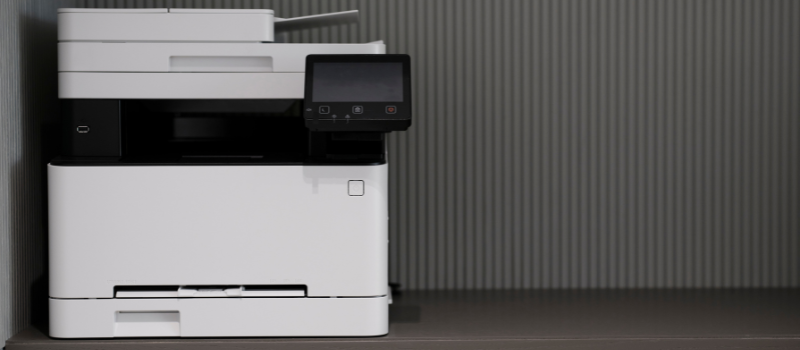
Although it may seem like something from the past, in the current digital world, physical printing remains a fundamental necessity for many. From the student who needs to print their notes to small businesses that manage invoices, choosing the right printer will make a big difference in productivity, efficiency, and, clearly, in the budget.
However, due to the wide range of options currently available on the market, making the final decision can be overwhelming. A myriad of technical specifications and features must be taken into account, which can sometimes make decision-making difficult.
But don't worry because in today's article we will present you with a definitive guide so you can navigate the labyrinth of printers, helping you find the perfect option that fits your specific needs. Forget about getting frustrated reading thousands of pages of incomprehensible specifications and confusing comparisons. Today you will discover in a clear, concise, and practical comparison the different most common types of printers with their own advantages and disadvantages. You will also discover what the key factors are that you should evaluate before making an informed decision.
Why is it worth buying the best printer in 2024?
Although it is true that the digital era has reduced the need to print on paper for many tasks, it is also true that the printer remains an indispensable device for a wide range of consumers. Although cloud and digital documents are increasingly predominant, there are still many reasons why you need to buy a printer in 2024, beyond nostalgia for paper.
To begin with, it is worth noting that efficiency in certain tasks is still favored by physical printing. Being able to review documents on paper, take notes directly on them or simply have a physical copy for offline reference is invaluable for many in the professional and academic context. Imagine, for example, an architect who has to review blueprints, a teacher who has to correct exams, or a doctor who analyzes X-rays. No matter how advanced the screens are, in certain contexts paper and immediacy are irreplaceable.
Likewise, it should be noted that printing is crucial for the management of important documents where security, trust and confidentiality are required. This is the case of contracts, legal documents or sensitive information where physical printing guarantees a higher level of security and control compared to the digital version that, no matter how encrypted, is not always completely secure. Also keep in mind, for example, that physical signatures on certain documents remain an essential requirement in many transactions.
In the professional sphere, printing continues to offer an experience that digitization has not yet fully managed to surpass. From printing photos for family albums to creating personalized crafts, the ability to convert digital files into tangible objects enriches the lives of many. This relates to the satisfaction of having a physical copy of a memory, a child's drawing, or a party invitation, which cannot be achieved with screen viewing.
Now, as you may have noticed, there are many reasons why consumers still need a printer today. However, as we've seen, choosing the right device can be a daunting task due to the large number of models available with different features and prices on the market. But don't worry, because below we present the different types of printers from top brands (Epson EcoTank, HP Smart, Canon Pixma, etc.) with their advantages and disadvantages so that you have a comparison at your fingertips.
Inkjet Printers
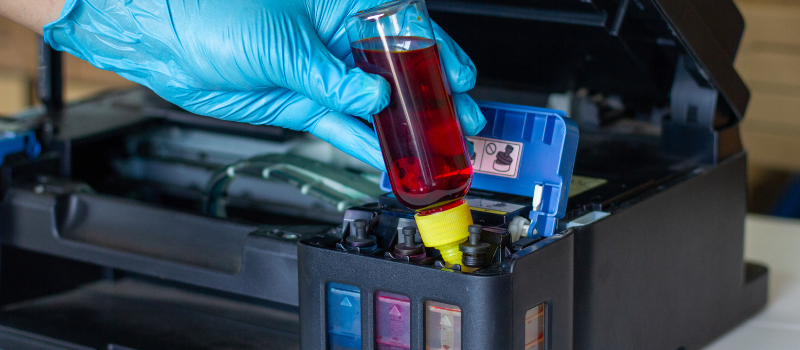
This type of printer sprays liquid ink onto paper to create the image. For this, individual or combined ink cartridges are used to offer a wide range of colors.
Advantages:
- Excellent photographic print quality with vibrant colors and very precise details.
- Relatively low purchase cost.
- Wide compatibility with different types of paper.
Disadvantages:
- High long-term cost of ink cartridges, especially when printing large volumes.
- Slow print speed compared to other models.
- Greater tendency to smears or blotches.
Laser Printers
Laser printing uses a powder toner that fuses to paper through heat. This is the mechanism that enables printing of sharp, high-definition images.
Advantages:
- High printing speed, ideal for large volumes of documents.
- Relatively low cost per page, especially in the long term.
- Sharp and defined printing, especially for text.
- Greater resistance to water and rubbing compared to inkjet prints.
- High purchase cost.
- Lower photo printing quality.
- Fewer types of paper compatible.
- Higher energy consumption.
Dot Matrix Printers
In the market you will also find what is known as a dot matrix printer. This device uses a print head with needles that strike an ink ribbon to transfer the image to paper. It is a robust and durable model whose print quality, however, is low.
Advantages:
- Great durability and resilience.
- Ability to print on continuous form paper.
- Low cost of consumables, i.e., ribbons.
Disadvantages:
- Low print quality.
- High noise during printing.
- Obsolescence in most current applications.
- Slow printing speed.
Multifunction Printers
You can also opt for a multifunction printer, which combines printing, scanning, copying and, sometimes, even fax in a single device.
Advantages:
- Convenience and space savings.
- Integration of several functions in a single unit.
- Generally cheaper than buying separate devices.
Disadvantages:
- The print, scan and copy quality is inferior to that of specialized devices.
- Greater complexity in troubleshooting technical issues.
- If one function fails, it can affect the others.
Dye-Sublimation Printers
If you're looking for high color quality, you may be interested in dye-sublimation printers, which use heat to transfer the dye onto special paper and reproduce durable image quality.
Advantages:
- High-quality images with vibrant colors.
- Durable prints and resistance to fading.
- Ideal for professional photography and graphic design applications.
Disadvantages:
- High cost.
- Requires the use of special paper.
- Slow printing speed.
- Not suitable for high-volume printing.
3D Printers
Finally, we don't want to fail to mention 3D printers, which allow creating three-dimensional objects from a digital model using materials such as resin, metal or plastic.
Advantages:
- Creation of prototypes and physical models.
- Possibility to manufacture customized objects.
- Applications in various industries, such as engineering, medicine and design.
Disadvantages:
- Very high device cost.
- Technical knowledge is required to use it.
- Slow printing speed.
- Limitations in compatible materials.
How to Choose the Best Home and Work Printer That Can Meet Your Needs?
In short, there is a wide variety of printer types at your fingertips in the market. That said, it's important to note that choosing the right device will depend on your individual needs and a consideration of a number of key factors.
Many experts emphasize that it's important to prioritize the device's integration with your workflow as a determining factor. A printer, beyond its technology, should integrate smoothly into the way you work.
That's why you should aim for a holistic approach that considers different aspects such as ease of use, connectivity, and compatibility with devices and software. A powerful model but difficult to configure and use can become a constant source of frustration, cancelling out all its technical advantages.
Therefore, here is a series of key factors we advise you to evaluate so you can make an informed decision that suits your needs:
- Easy to use: It is important to choose a device to print documents and photos with an intuitive interface, both at the control panel level and in the software. A very complex and unclear menu can cause confusion and slow down work. Also, assess that installing ink or toner cartridges is simple to facilitate refilling and replacement without frustration.
- Connectivity and compatibility: Consider that wireless connectivity, such as Wi-Fi, Bluetooth, and NFC, is essential for today's consumers, as it allows prints from smartphones, tablets, mobile devices, or laptops. Make sure the printer is compatible with your operating system, whether Windows, macOS, Android or iOS, as well as with the applications you use frequently. The ability to print directly from the cloud or storage services greatly simplifies the workflow.
- Printing volume: You should also consider and estimate the number of pages you typically print monthly or annually. This is a fundamental piece of data to determine the printer's capacity and consumables performance. If the printer is designed for low print volumes, it may be insufficient for offices where large quantities are printed daily, causing frequent jams or premature wear. Conversely, a high-performance printer may be excessive for a home user with few printing needs.
- Additional features: Before making the purchase, evaluate features such as duplex printing, borderless printing, the ability to scan and copy documents and compatibility with different paper types and sizes. Remember that each additional feature can also increase the price and complexity of the device, as occurs if you want to print double-sided.
- Total cost of ownership: When making the purchase, don't focus solely on the price of the printer. The total cost of ownership includes the cost of consumables, whether ink or toner, as well as maintenance or repair costs. Before selecting the device you want, it's important to consider these costs to have a complete picture of long-term expenditure.
Conclusion
To close today's buying guide, we want to highlight that finding the perfect printer requires understanding your own needs and carefully evaluating the options presented in this guide.
With the tips we've just mentioned you will be able to navigate the printer market considering the key factors that go beyond the simple type of printer, so that you can make an informed decision and acquire the best solution based on your budget and workflow.