




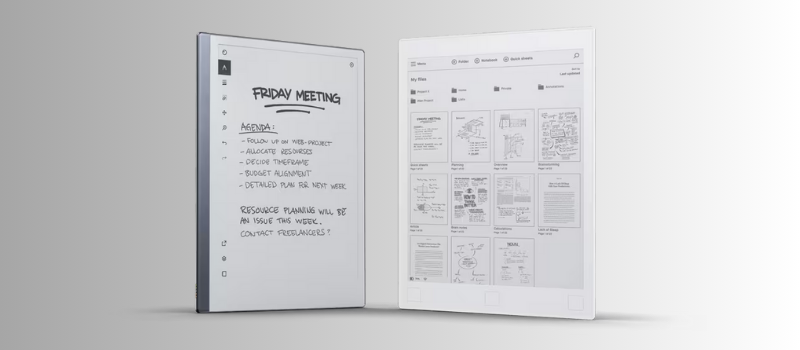
In a world saturated with screens and notifications, the reMarkable 2 arrived with a clear promise: to help you think without distractions. Since its launch, this digital notebook has earned a special place among those who want to write by hand without giving up the convenience of digital. But it's 2025, and the inevitable question is: is the reMarkable 2 still worth it or has it fallen behind?
This analysis aims to answer that doubt with total honesty. We'll review its current performance, its user experience, the improvements it has received (or not), and how it compares against newer alternatives. Is its monochrome e-ink display still as pleasant as promised? Is writing as smooth as we remembered? How does it perform day to day for those who take notes, sketch, or simply want a distraction-free space? It isn't a cheap device, and if you're thinking of investing in one this year, it's worth knowing all the good and the bad it offers. Join me on this full tour of the reMarkable 2 in 2025: we'll analyze it under a magnifying glass so you can make the best decision.
Minimalist design and hardware: the silent elegance of the reMarkable 2
One of the first things that strikes you when holding the reMarkable 2 is its impressive thinness. With a mere 4.7 mm thick and a weight of 403 grams, it feels lighter than many tablets and even some modern smartphones. In fact, it feels almost like you're holding a small notebook or a few loose sheets. That lightness, combined with its sober design, makes it a device that conveys a sense of immediate sophistication.
The body is made of high-quality aluminum, which represents a notable leap over the previous model, which used plastic. The back, for its part, is polycarbonate with a soft touch that prevents unnecessary slipping. All in all, the EPUB e-reader feels sturdy, solid, and very well built, despite its extreme thinness. You can carry it in your backpack all day without hardly noticing it, whether by weight or by bulk.
Aesthetically, the reMarkable 2 leans hard into the purest minimalism. There are no physical buttons on the front, nor adornments that distract. Only a discreet power button located on the top edge breaks the clean symmetry of the design. The generous bezels surrounding the display aren't just a style choice: they're there so you can hold the device comfortably without accidentally turning on the screen, something many users particularly value compared to all-screen tablets where accidental touches are almost inevitable.
A practical and well-resolved detail: the device's side incorporates magnets to secure the digital pen, which prevents you from losing it and keeps it always at hand when you need it.
The screen, without a doubt, is one of the stars of the show. It's a monochrome e-ink panel of 10.3 inches, with a resolution of 1872 x 1404 pixels (226 ppi), offering a reading experience very similar to paper. That said, it doesn't have backlighting, which means you'll need ambient light to use it. For some, that's a drawback, especially if you like to write at night or in dim spaces.
Now, the real magic lies in the Canvas surface, which has a matte texture with a slight level of friction. That friction, yes, even with a small sound similar to pencil on paper, makes writing on the reMarkable 2 feel incredibly natural. Not the slippery sensation that other touch screens have, where writing can feel off—the writing here truly resembles doing it on paper.
As for the hardware, don't expect flagship specs. It uses a dual-core ARM processor at 1.2 GHz and 1 GB of RAM. But for what it's designed for—writing, reading and drawing without distractions—it is more than enough. The operating system is lightweight, the pen input responds smoothly (with a latency of just 20 ms), and there are no delays or lags when turning pages or taking notes.
In short: a design cared for down to the last detail and a performance perfectly balanced for its purpose.
A distraction-free tool: what it's like to use the reMarkable 2 e-ink screen in daily life
Switching the classic paper notebook for the reMarkable 2 has been, for many users, a transformation that goes beyond technology. This device isn't trying to replace a traditional tablet, nor compete with a laptop. Its proposition is simpler, and at the same time more ambitious: to offer a space of pure concentration, without distractions, where the only thing that matters is thinking, reading, and writing.
From the first power-on, it's clear the focus is different. The interface is minimalist to the extreme, with a clear and clean menu. There are no traces of notifications, social networks, or apps that pull you away from your focus. You can create notebooks, take handwritten notes, open PDFs or EPUB-format books... and nothing else. It may seem limiting, but with daily use you begin to understand the value of that limitation: the reMarkable 2 invites you, and almost compels you, to concentrate.
The writing experience is simply excellent. The Marker pen responds with surprising fluency, with barely perceptible latency, and the stroke appears instantly, with precision and smoothness. The screen has a matte texture that very well imitates the feel of real paper, generating a a small friction that makes handwriting feel natural, even enjoyable. Nothing like the slippery feel that other touch screens have.
Taking notes in meetings, jotting down ideas on the fly, or highlighting PDF documents feels comfortable even in long sessions. The reMarkable 2 doesn't generate heat, doesn't emit light, and its shape resembles a large notebook, so writing with it is very different from using an iPad or another device. There are no visual distractions or stray stimuli. Only you, the pencil, and what you're thinking.
When it comes to reading or correcting documents, the reMarkable 2 also shines. Opening heavy PDF files is fast, and flipping pages has that small flicker typical of e-ink displays, but it isn't bothersome. You can add annotations, drawings, or highlights directly on the text, ideal for those who work reviewing written material or studying with notes.
A very useful detail is the handwriting recognition function (OCR), which allows you to convert your handwritten notes into editable digital text. The accuracy is surprisingly good, even with hard-to-read handwriting. While it's not perfect, it greatly reduces transcription work and is practical for those who later want to edit their notes or share them by email.
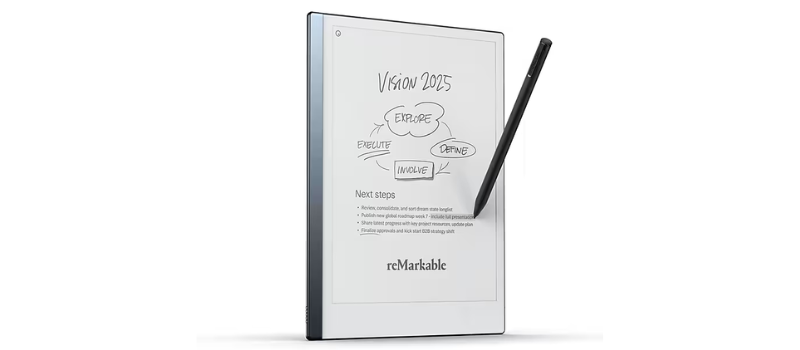
That said, it's important to be clear about what the reMarkable 2 is not: it's not a multimedia tablet. It doesn't play videos, it doesn't have a web browser, nor does it allow installing apps like WhatsApp or Gmail. Nor is it compatible with all file formats. Native support is PDFs, EPUBs, PNG or SVG images, but it doesn't open Word, PowerPoint, or Excel documents directly. You have to convert them to PDF first. In my personal experience, this wasn't a big issue, but I recognize it can be inconvenient for those who work with many presentations or Office files.
The battery life is another point to highlight. Although the brand promises up to two weeks on a single charge, it depends on usage. At a daily work pace of 2 to 3 hours, I achieved between 8 and 10 days of continuous operation, which is still very good. Being able to forget about the charger for the entire workweek is something few tablets can offer. Additionally, it charges via USB-C and in about two hours it's ready to use again.
One point to note is the absence of backlighting. Like a traditional book, you need an external light source to use it at night. This can be a drawback if you're used to reading in bed with the lights off. In my case, I ended up turning to a Kindle for that time of day, though during work or study hours I didn't miss it.
Accessories analysis of the reMarkable 2: elegance, functionality, and a premium touch
One of reMarkable's great wins has been building a small, but very well-thought-out, ecosystem of accessories to complement its digital notebook. Although the reMarkable 2 works perfectly on its own, having its official accessories can greatly improve the user experience, both in protection and versatility. That said, these extras come with a price, sometimes high.
Cases: protection without sacrificing style
Let's start with the cases, known as Folios. These covers attach magnetically to the device and are custom-designed. The standout is the original Book Folio, which is available in a variety of materials, from polymers to genuine leather, and in different colors. Its book-like design complements the reMarkable 2's minimalist aesthetic very well, without adding unnecessary weight or bulk.
When it comes to transporting it, this case offers discreet and effective protection. Using it is almost like carrying the tablet without a case, but with the peace of mind that it's safe from bumps and scratches. A detail that could be improved? Not all models include a flap to hold the Pencil (Marker), so it can move or even fall out if you carry it in a bag or briefcase.
Type Folio: the keyboard that transforms the device
For those who need more than handwritten notes, the Type Folio is the star accessory. It is a case with an integrated physical keyboard that turns the reMarkable 2 into a kind of mini writing laptop. It connects directly via magnetic pins, without the need for Bluetooth or its own battery, and allows you to easily switch between handwriting and keyboard writing simply by changing the folio's position.
Although the keys are small, the typing comfort is surprising. After a few minutes of adjustment, writing long paragraphs becomes fluent and natural. It is an accessory designed for writers, students, or those who draft content frequently and seek a distraction-free environment. The problem? Its price: around €219, almost half the cost of the reMarkable 2 itself. It's not for everyone, but for those who need it, it can be a useful investment.
Marker and Marker Plus: writing like on paper
The pencil, called the Marker, is a key piece of the reMarkable 2. It doesn't require batteries or charging, works by induction and comes with 9 spare tips. These tips wear down with use, like a traditional pencil, and the replacement process is simple and quick. In general, a tip can last 3 to 7 weeks, depending on how much you write and how much pressure you apply.
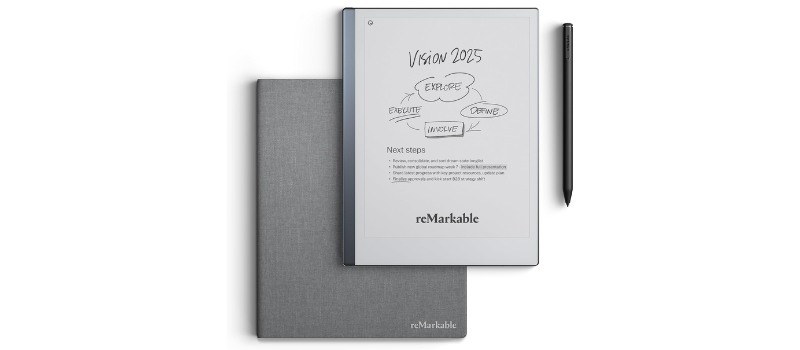
In addition to the standard Marker, there is the Marker Plus, which adds a digital eraser at the end, like classic pencils. It also has a black metal finish, more elegant and with a slightly higher weight that conveys that premium product feel. It costs around €50 more than the standard, and although both offer the same writing performance, the Plus provides extra comfort that many users appreciate.
Other options and the Connect service
There is also the Model Folio, a more affordable case (€89) that protects both the tablet and the pencil, ideal if you're looking for something practical without overspending. And we can't forget Connect, reMarkable's cloud synchronization service. For about €3 per month, it keeps your notes up-to-date across all your devices. It's not mandatory, but it greatly improves the overall experience.
In short, the reMarkable 2's accessories catalog is carefully designed for those seeking a clean, functional, distraction-free work environment. You can use the device as it comes, yes, but having the ability to customize it to your habits adds value that many will know how to take advantage of.
Conclusion: is the reMarkable 2 still worth it in 2025?
After intensive use, it's clear that the reMarkable 2 remains an excellent option in 2025 for those who want to write, read, and organize ideas without distractions. Although it's not the latest model nor the most feature-rich, its writing experience remains unbeatable, with a sensation almost identical to paper.
The good news is that, despite the years, it continues to receive updates and shares the same operating system as its successor, the Paper Pro. This keeps it current and functional, even against newer alternatives with more features. If your priority is concentration and high-quality handwriting, the reMarkable 2 with the app has a lot to offer… and now, at a more affordable price.