





The gaming scene is constantly evolving. New proposals emerge all the time, but only a few truly manage to break with the status quo. The Razer Joro is one of those exceptions. This wireless, compact, and minimalist keyboard not only aims to stand out for its design, but directly aims to redefine what is expected of a gaming peripheral in full 2025. And it does so without fanfare, but with a clear intention: to be different, to be useful, to be necessary.
In an environment where RGB, bulky, and over-the-top design usually dominate, the Joro bets on sobriety, on efficiency, and on portability that until now seemed incompatible with high performance. It is small, yes, but it does not fall short in power. Equipped with state-of-the-art technology and flawless connectivity, it promises a smooth gaming experience, distraction-free, with a touch of elegance that many demanding users will know how to appreciate.
Throughout this analysis we will explore its key features, evaluate its real-world performance, and, above all, attempt to answer a central question: Are we looking at just another keyboard... or at a new standard for future gaming?
A compact, portable design that doesn’t compromise on quality: this is the body of the wireless Razer Joro
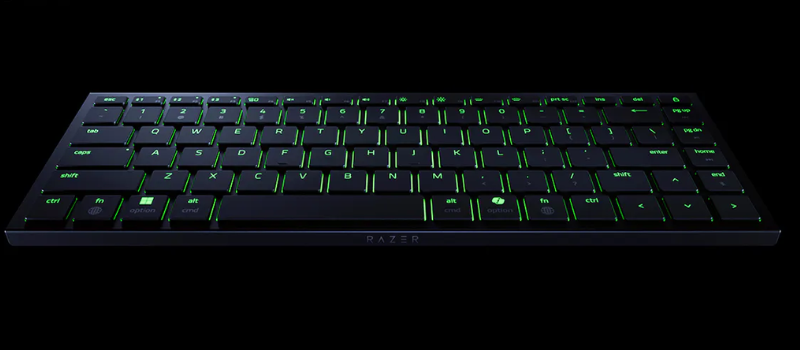
When you think of a gaming keyboard with arrow keys, the first thing that usually comes to mind is a robust, heavy device with a sizeable footprint. However, the Razer Joro completely breaks that mold. Its proposition is based on an ultracompact design that proves portability and performance do not have to be at odds. It’s a clear bet on efficiency without sacrificing quality, something not all manufacturers manage to balance.
With dimensions of 29.8 cm wide, 11.2 cm deep and barely 1.65 cm thick, this keyboard positions itself as one of the thinnest and lightest in its category. Its weight of 374 grams makes it an ideal companion for those who need mobility without giving up a solid typing experience. It fits perfectly in a backpack or bag, and its low profile makes it extremely comfortable for long sessions, whether at a desk or on the move.
Compact, but functional
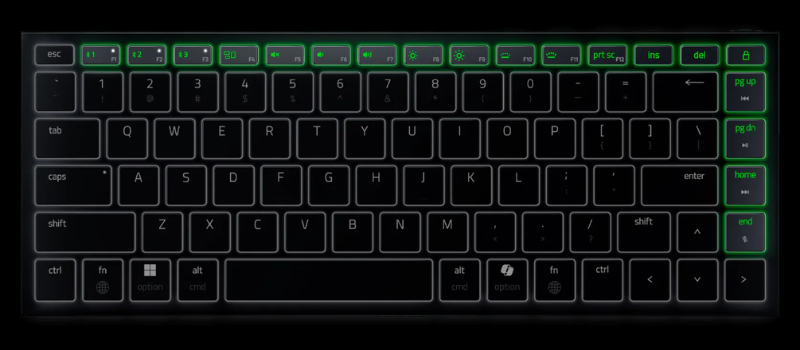
The Joro’s layout is a 75%, a smart choice that keeps the full row of function keys and the directional arrows at full size. This allows maintaining a familiar and practical arrangement without occupying the space of a full keyboard. The total number of keys is 84, making it ideal for gamers, content creators, and professionals who value a clean yet complete design. That said, as is typical with this format, the numeric keypad is removed to save space.
The keyboard layout is US ANSI, which can be an advantage for those accustomed to more spacious keys or who use specific commands in English. In addition, it features single-zone Razer Chroma RGB lighting, fully configurable, giving it that aesthetic touch so characteristic of the brand, without going overboard.
Premium materials in every detail of the wireless keyboard
Although the Joro presents itself as a lightweight keyboard, its materials are far from flimsy. The top of the chassis is made of 5052 aluminum alloy, a material that provides structural solidity and an elegant finish. On the other hand, the base and keys are crafted from ABS plastic, with a special treatment that includes laser engraving and UV coating, designed to resist daily wear and tear.
This model lacks traditional lift-off feet, which may seem like a drawback at first. Nevertheless, its slight lateral tilt and its non-slip rubber feet ensure a stable and comfortable stance. The keyboard remains firmly on any surface, even during intense gaming or typing sessions.
Modern connectivity and silent switches for gaming
Regarding connectivity, the Razer Joro includes a USB-C port, which facilitates fast charging and direct connection when needed. Inside, low-profile scissor switches are used, which offer quick and silent response, ideal for both gaming and productivity. It’s an interesting option for those who prefer softer and more discreet typing, without the typical mechanical noises.
In short, the design of the Razer Joro not only stands out for its minimalist and modern aesthetics, but for how it manages to condense performance, durability, and portability into such a small body. It’s a well-thought-out offering for an audience that no longer wants to choose between functionality and style. Here, it has it all.
A quiet, fluid, and surprisingly comfortable experience: daily use of the new Razer Joro
After several weeks of working and gaming with the Joro as my primary keyboard, there is one thing that jumps out — or rather, that can be heard from the first moment: its absolute silence. In a world full of mechanical keyboards that sound like modern typewriters, the Joro presents itself as a discreet alternative, perfect for shared environments, video calls, or night sessions where you don’t want to wake anyone. The ultra-low-profile scissor switches do an impeccable job muffling the sound, and the high-quality keys add points in comfort and precision.
Soft typing that doesn’t lose agility with the ultra-compact wireless keyboard
The typing experience with this model is, unlike the razer basilisk mobile, in a word, a delight. Both for drafting long articles like this one and for managing commands during more intense gaming sessions, the keyboard responds with smoothness and enviable accuracy. The short travel of 1.6 mm, along with a well-calibrated tactile response, makes every keystroke count. There are no mushy sensations or doubts when pressing: everything is fast, direct, and clean.
As a writer, this precision has considerably improved my workflow. I can type for hours without fatigue, thanks to the flat design’s ergonomics and the firm feel of its customizable keys. In addition, the natural slight lateral tilt, together with its rubber feet, prevents the keyboard from moving, even when typing with energy and speed. It stays exactly where it should be, without needing to constantly rearrange it.
Seamless connectivity and exemplary autonomy of the ergonomic keyboard
Another aspect that has surprised me the most about the Razer Joro is the stability of its wireless connection. Although it runs via Bluetooth 5.0, I have not noticed a single disconnect or delay, not even when switching between devices. In fact, one of its great strengths is the ability to pair up to three devices simultaneously and switch between them instantly using a simple keyboard shortcut. It’s a feature that makes a difference in multitasking environments and significantly speeds up daily productivity.
As for the battery, the keyboard mounts a 1960 mAh unit that has exceeded my expectations. Despite keeping the RGB backlighting active and constantly alternating between my laptop and my tablet, I haven’t needed to charge it in a full week of intensive use. According to official data, with the Power Saving mode enabled—which turns off the illumination—it can last up to 1800 hours. That translates to about 75 days of continuous use, making it one of the keyboards with the best autonomy in its category.
A weak point: the US layout and the necessary adaptation
That said, not everything is perfect. The keyboard comes with a US ANSI layout, which means it does not include the classic Ñ key nor some symbols that Spanish speakers use frequently. If you’re not used to it, it can be frustrating at first, especially in tasks that require a lot of writing with accents, symbols, or punctuation marks typical of Spanish. Adapting requires practice and patience, although over time you end up memorizing the position of the “missing” keys.
Despite this inconvenience, the Razer Joro has managed to become one of my favorite tools for writing. Its reliability, silence, comfort, and speed place it in the top tier of keyboards ideal for writing professionals, even with that small adaptation challenge.
Intuitive customization and elegant aesthetics
The keyboard feels premium the moment you touch it. The upper aluminum plate conveys robustness, while its minimal thickness and light weight make it easy to transport. Even if you move it from one desk to another, the sense of solidity never disappears.
Regarding customization, the Razer Synapse 4 software allows complete configuration in Windows: reassign keys, create macros, or play with the Chroma RGB lighting effects until you find the perfect style. The range of options is very broad and is especially appreciated if you enjoy a visual environment tailored to your style. That said, if you use macOS, you should know that the application is only available for Windows, which limits access to advanced features from Apple devices.
Razer Synapse 4: the perfect complement to customize the Joro to your style
One of the aspects that really elevates the Razer Joro experience is outside the hardware: the Razer Synapse 4 software, a platform that turns a compact and powerful keyboard into a tool fully adapted to your needs. From the first moment, its integration is flawless. Just connect the keyboard to a Windows computer so the system detects it and starts showing all available configuration options in a clean, intuitive, and fast interface.
Reassign, automate, and control
On the software’s main tab, the user has the freedom to reassign any key of the Joro. Need to place a specific function on a less-used key? You can do it in seconds. This flexibility is especially useful for users who type in different languages, or who need to adapt the US keyboard layout to their own work preferences.
Additionally, Synapse 4 allows creating custom macros, ideal for executing sequences of complex actions with a single press. This is not only useful in gaming, but also for professionals who use creative software, repetitive commands, or automated workflows.
RGB lighting with its own mark
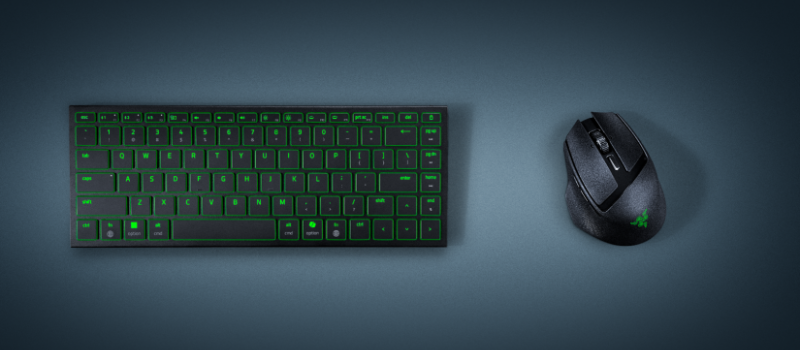
One of the most striking points of the Razer Joro is its single-zone Chroma RGB backlighting, which becomes a visual spectacle when managed from Synapse. The program offers a wide range of effects and combinations, with precise controls for color, intensity, and speed. You can opt for dynamic effects like "wave", "reactive" or "breathing", or keep a fixed hue if you prefer something more discreet.
The interesting part is that the lighting can synchronize with other compatible Razer devices, such as mice, headsets, or mousepads. This allows creating a uniform and personalized lighting ecosystem that adapts to the system’s state, active games, or simply your personal taste. And as if that weren’t enough, you can save complete profiles that activate automatically depending on the software you’re using.
Extra features for an even smoother experience
Synapse 4 doesn’t stop at aesthetics. Among its most notable tools is Snap Tap, a function that optimizes the keyboard’s response in scenarios of rapid or combined key presses, prioritizing the last key pressed. This is essential in games where every millisecond counts, but also in demanding programs where multiple shortcuts are used simultaneously.
Moreover, the ability to save your configurations in the cloud allows your profiles to travel with you. You switch devices, log in, and everything is ready as you left it.
And on Mac?
While the Razer Joro is fully functional on macOS, the big missing piece at the moment is a complete version of Synapse 4 for this operating system. This limits access to advanced features, especially those related to deep customization and RGB lighting. Razer has confirmed they are working on it, and many users — especially creatives who use Mac — are eagerly awaiting a definitive solution.
Conclusion: a compact keyboard that exceeds expectations
The Razer Joro is not simply another compact keyboard: it’s a statement of intent. From its light and stylish design to its silent and precise performance, everything in this model is designed to deliver a high-level experience without sacrificing portability or aesthetics.
Throughout the analysis we have seen that it more than fulfills both productivity and casual gaming. Its quiet keyboard, its excellent autonomy, and the ability to work across multiple devices thanks to Bluetooth 5.0 make it a versatile tool, especially attractive for those who need mobility and functionality in equal measure.
Although its US layout may pose a small challenge for those used to Spanish keyboards, the adaptation is quick, and the features it offers end up more than compensating for that detail.
Customization through Razer Synapse 4 completes a very complete offering. Being able to configure every aspect of the keyboard—from functions to lighting—adds a level of control that the most demanding users will know how to value.